Teachers who sign in can assign LessonRally activities to their Google Classroom classes: students open them in Classroom and answer online, and their grades go to the teacher's Classroom gradebook. Practice lets you try it first, the way students see it.
Students read everyday scenarios about posts, photos, comments, likes and old accounts, and choose what to do. They learn that others can copy or share a post, that deleting a post doesn't promise it is gone, that privacy settings limit who sees a post without making it private forever, and how to build a digital footprint they're proud of. Digital citizenship practice.
Learning goal: Explain what adds to a digital footprint, and choose posting and sharing habits that build a positive one, knowing that deleting and privacy settings help but do not guarantee a post stays private.
Estimated reading level5.0
Grade 3Hard
Grade 4Stretch
Grade 5On level
Grade 6Easier
Grade 7Easy
About this estimate
The estimate is halfway between the two middle scores of four readability formulas. Their scores run from 3.4 to 6.5.
Flesch-Kincaid Grade Middle scoreSentence length and syllables per word4.4
Gunning FogSentence length and words of three or more syllables6.5
Coleman-Liau Middle scoreLetters per word and sentences per 100 words5.5
Automated Readability IndexCharacters per word and words per sentence3.4
Grade 181216
Flesch Reading Ease
83.7 on a 0 to 100 scale where higher is easier: easy. Not part of the estimate.
Text measured
656 words, 23 sentences
Adapted from common readability formulas (Flesch-Kincaid, Gunning Fog, Coleman-Liau and ARI, plus SMOG for long texts), which look at sentence length and word length. Answer choices count toward word length only. Grades below the estimate will likely find the text harder, grades above it easier. It does not measure ideas, background knowledge or images.
Question types: multiple choice, select all that apply.
Student preview
The questions as students see them, without the answers.
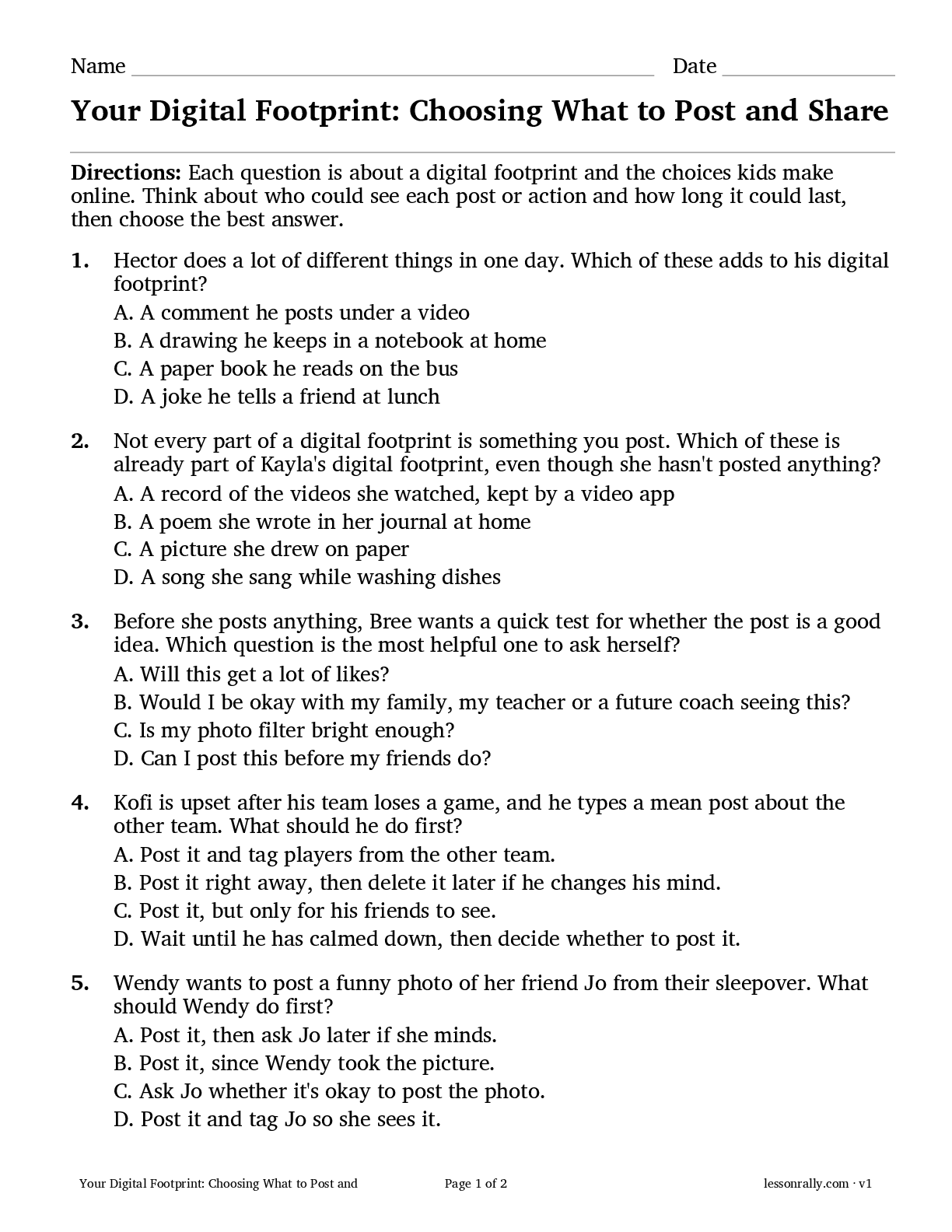
Each question is about a digital footprint and the choices kids make online. Think about who could see each post or action and how long it could last, then choose the best answer.
Question 1
Hector does a lot of different things in one day. Which of these adds to his digital footprint?
Choose one answer.
A comment he posts under a video
A joke he tells a friend at lunch
A paper book he reads on the bus
A drawing he keeps in a notebook at home
Question 2
Not every part of a digital footprint is something you post. Which of these is already part of Kayla's digital footprint, even though she hasn't posted anything?
Choose one answer.
A picture she drew on paper
A song she sang while washing dishes
A poem she wrote in her journal at home
A record of the videos she watched, kept by a video app
Question 3
Before she posts anything, Bree wants a quick test for whether the post is a good idea. Which question is the most helpful one to ask herself?
Choose one answer.
Can I post this before my friends do?
Is my photo filter bright enough?
Would I be okay with my family, my teacher or a future coach seeing this?
Will this get a lot of likes?
Question 4
Kofi is upset after his team loses a game, and he types a mean post about the other team. What should he do first?
Choose one answer.
Post it, but only for his friends to see.
Wait until he has calmed down, then decide whether to post it.
Post it right away, then delete it later if he changes his mind.
Post it and tag players from the other team.
Question 5
Wendy wants to post a funny photo of her friend Jo from their sleepover. What should Wendy do first?
Choose one answer.
Ask Jo whether it's okay to post the photo.
Post it and tag Jo so she sees it.
Post it, since Wendy took the picture.
Post it, then ask Jo later if she minds.
Question 6
Nia wants her posts to add up to a digital footprint she can be proud of. Which post would help most?
Choose one answer.
A photo of the robot she built for the science fair
An angry post about a teacher
A post making fun of someone's outfit
A photo that shows her house number
Question 7
Maren deleted an old post yesterday, and she keeps her account set so only her friends can see her posts. Which two statements are true? Choose 2.
Choose 2 answers.
Her friends-only setting hides her posts from everyone, even her friends.
Deleting the post took it off her page, but copies someone made before may still exist.
Deleting the post erased every copy of it everywhere.
Her friends-only setting limits who can see her posts, but a friend could still share one.
Her friends-only setting means no one can ever screenshot her posts.
Question 8
Otis taps Like on lots of posts every day. Which statement about his likes is true?
Choose one answer.
Likes don't count because they aren't words.
Likes vanish as soon as he closes the app.
Only his best friend can ever see his likes.
His likes are things he does online, so they can become part of his digital footprint.
Question 9
Ari's cousin posted a photo of Ari with a caption Ari doesn't like. What should Ari do first?
Choose one answer.
Post an embarrassing photo of his cousin back.
Leave an angry comment under the photo.
Ask his cousin politely to take it down or change the caption.
Ignore it and assume nobody will ever see it.
Question 10
Luca stopped using an old game account a long time ago, but its public profile still shows his photo and a silly bio. What is a good step for him to take?
Choose one answer.
Add more silly posts so the old ones get pushed down.
Leave it alone, since nobody can find old accounts.
Share the profile link so people know it's old.
Ask a parent to help him delete the account or limit who can see it.