Question 1
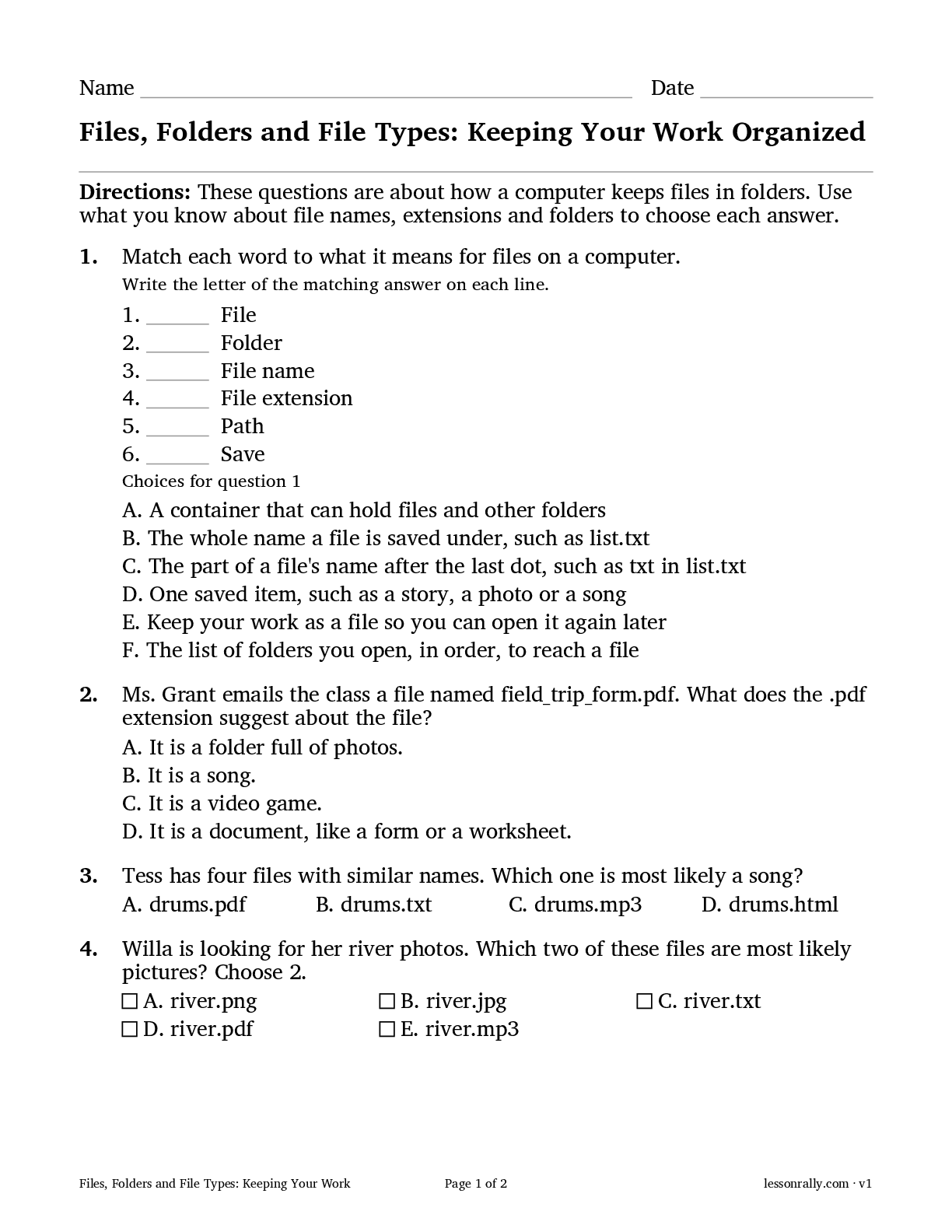
Match each word to what it means for files on a computer.
Match each item to an option.
Items
- File
- Folder
- File name
- File extension
- Path
- Save
Options


Teachers who sign in can assign LessonRally activities to their Google Classroom classes: students open them in Classroom and answer online, and their grades go to the teacher's Classroom gradebook. Practice lets you try it first, the way students see it.
Free for teachers. Sign in to assign activities to your Google Classroom classes.
 (opens in a new tab)
2 pages · Student copy, no answers
Print worksheet (opens in a new tab)Answer keyPremiumStudents match words like file, folder, file name, file extension, path and save to their meanings. Then they use extensions such as .txt, .jpg, .mp3 and .pdf as hints about the kind of file, count files inside folders within folders, follow a path, and see that renaming an extension doesn't change what is inside a file.
Learning goal: Explain how files and folders are organized, use a file extension as a hint about the kind of file, and follow a path to a file.
The estimate is halfway between the two middle scores of four readability formulas. Their scores run from 2.8 to 5.6.
Adapted from common readability formulas (Flesch-Kincaid, Gunning Fog, Coleman-Liau and ARI, plus SMOG for long texts), which look at sentence length and word length. Answer choices count toward word length only. Grades below the estimate will likely find the text harder, grades above it easier. It does not measure ideas, background knowledge or images.
Topic: Computers and Networks Chosen by LessonRally
Question types: matching, multiple choice, select all that apply, number answer.
The questions as students see them, without the answers.
These questions are about how a computer keeps files in folders. Use what you know about file names, extensions and folders to choose each answer.
Match each word to what it means for files on a computer.
Match each item to an option.
Items
Options
Ms. Grant emails the class a file named field_trip_form.pdf. What does the .pdf extension suggest about the file?
Choose one answer.
Tess has four files with similar names. Which one is most likely a song?
Choose one answer.
Willa is looking for her river photos. Which two of these files are most likely pictures? Choose 2.
Choose 2 answers.
Andre renames his song file from beat.mp3 to beat.jpg. What happens to what is inside the file?
Choose one answer.
Bea drags a photo from the folder Trip into the folder Best Photos. Now the photo is in Best Photos and is no longer in Trip. What did Bea do?
Choose one answer.
The folder Projects holds a folder named Art, a folder named Music and a file named plan.txt. Art holds a file named sun.jpg and a folder named Sketches. Sketches holds two files, cat.png and dog.png. Music holds one file, drum.mp3. How many files are inside Projects in all, counting the files inside every folder?
Enter a number.
Harper's report is in a folder named Science. Science is inside a folder named School, and School is inside a folder named Documents. In these paths, > means "go inside." Which path leads to her report?
Choose one answer.
Paul's Documents folder is a jumble: 30 photos from a class trip are mixed in with his homework files. What is the best way to organize them?
Choose one answer.
Gia is saving her science report about how plants grow. Which file name will be easiest to find later?
Choose one answer.
No reviews yet.
Reviews come from teachers who assigned this activity to a class.
Have a topic of your own? Make a printable worksheet and online quiz, free.
Create an activityMade by Aisha Varrick · LessonRally (AI-assisted)
Made by Aisha Varrick · LessonRally (AI-assisted)
Made by Aisha Varrick · LessonRally (AI-assisted)
Made by Aisha Varrick · LessonRally (AI-assisted)